

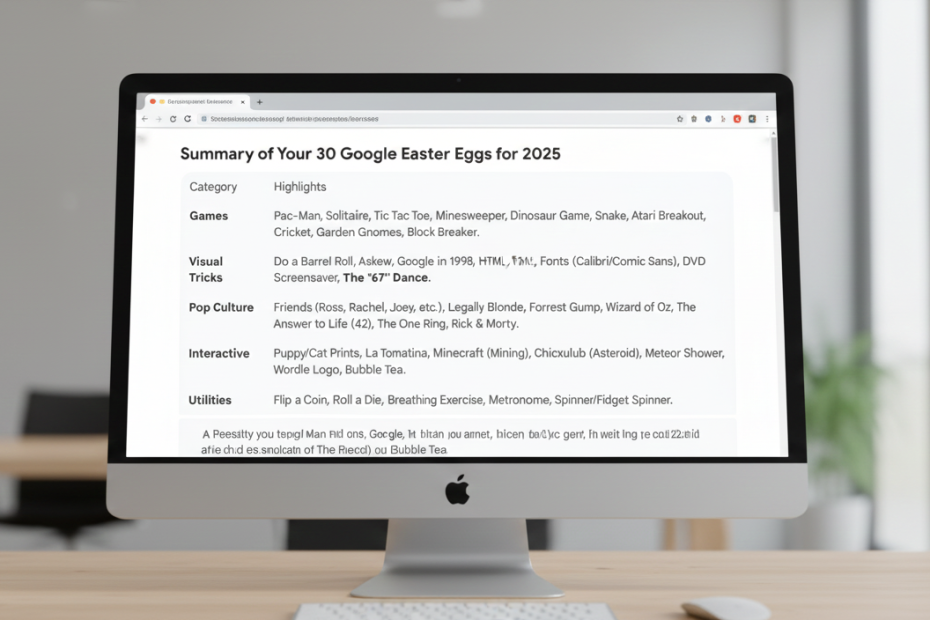
Google Search isn’t all just about finding information. The developers have hidden a bunch of fun surprises throughout the years, known as Easter eggs. Whether you’re a curious explorer or someone looking to add a bit of fun to your day, these Easter eggs offer a delightful break from the ordinary
In this article, we’ll dive into 30 of the most entertaining Google Easter eggs and secrets, each one ready to turn your search into an unexpected adventure.
Classic google easter eggs
Who needs a separate gaming console when you can play directly in your search results? Google offers a surprising variety of classic games.
- Pac-Man
Search for “Pac-Man” to fire up a nostalgic game. Clicking the down arrow underneath reveals Google’s other playable games.
- Solitaire:
Test your skills by searching “Solitaire.” You can even choose between easy and hard modes.
- Tic Tac Toe:
Challenge the AI or a friend by searching “Tic Tac Toe.”
- Minesweeper:
Search for it, click ‘Play,’ and choose your difficulty to start avoiding hidden bombs.
- Dinosaur Game:
The most famous egg! If your internet drops, hit the spacebar on the “No Internet” page to start the side-scroller.
Visual Search Tweaks
These tricks manipulate the very layout of your browser for a quick laugh.
“67” Dancing Screen (New for 2025!)
This is one of the newest viral trends to hit Google.
- How to find it: Type “67” into the search bar.
- What happens: Instead of just showing math results, small colorful, confetti-like shapes appear and float across the screen, making the entire search page look like it’s “dancing.” It’s a pure visual treat that has taken social media by storm in late 2025!
- Do a Barrel Roll:
Search this to watch your results perform a 360-degree spin—a nod to the classic game Star Fox 64.
- Google in 1998:
Take a trip down memory lane and see exactly what Google looked like the year it launched.
- Askew:
Searching for “askew” tilts the entire page slightly to the right.
- Blink HTML:
A tribute to 90s web design; search “blink HTML” to make certain words in the results flash on and off.
- Fonts:
Search for a specific font like “Calibri” or “Comic Sans,” and Google will change the results page text to that font.
Interactive Tools
Google isn’t just a search engine; it’s a toolbox of random (and helpful) gadgets.
- Flip a Coin or Roll a Die:
Perfect for settling disputes. You can even choose how many sides your die has.
- Breathing Exercise:
Search “breathing exercise” for a 1-minute guided session to help you destress.
- Metronome:
Musicians can find a virtual metronome by searching for the word.
- Spinner & Fidget Spinner:
Search “spinner” for a numbered wheel, or toggle the switch to play with a virtual fidget spinner.
Seasonal & Cultural Surprises
Google often gets into the holiday spirit with animations that appear when you search for specific celebrations.
- Festivus:
Search for this Seinfeld holiday to see a plain aluminum pole appear on the left side of your screen.
- Themed Animations:
Search for Halloween, Christmas, Hanukkah, or Kwanzaa during their respective seasons for festive backgrounds and interactive icons.
- Animal Sounds:
Search “What sound does a cow make?” to hear high-quality audio clips of almost any animal.
Fun Facts & Wordplay
- I’m Feeling Curious:
Type this (or “fun facts”) to get a random snippet of knowledge.
- Anagram:
Search for “anagram” and Google will ask, “Did you mean: nag a ram?
Lesser-Known Gems
While some are famous, these hidden secrets are for the true “power users.”
- The Answer to Life:
Fans of The Hitchhiker’s Guide to the Galaxy should search for “the answer to life the universe and everything” to see the calculator return 42.
- Bletchley Park:
Searching for this historic site will show the Knowledge Graph “decoding” the name in real-time.
- Forrest Gump:
Search for the movie title to see a small animation of Forrest running across your screen.
- La Tomatina:
Search for the Spanish festival and click the tomato icon to start throwing virtual tomatoes at your search results!
- Minecraft:
Search for “Minecraft” and click the grass block to “mine” through the results page.
- Puppy & Cat Prints:
Search for “puppy” or “cat” and click the paw icon. Now, every click on the screen will leave a colorful paw print accompanied by a bark or meow.
- Wordle:
Search “Wordle” to see the Google logo transform into the iconic green and yellow tiles.
- Legally Blonde:
Search for the film and click the pink purse to see Bruiser the chihuahua and turn your screen pink.
- Chicxulub Impact:
Search “meteorite” or “chicxulub” to see an asteroid streak across the screen and cause a “shake” upon impact.
- Google Block Breaker
To truly master the game, you need to understand the google block breaker rules. You start with three lives. Every time the ball hits a brick, you gain points. If the ball hits the bottom of the screen, you lose a life.
Conclusion
Searching the web doesn’t have to be a mundane task. Google’s developers have made sure that if you look close enough, you’ll find a bit of magic tucked away in the code. Next time you’re bored at work or school, try one of these out you might just find a new favorite way to procrastinate.
FAQs about 30 google easter eggs that still work in 2026
1. What is the most famous Google Easter Egg that still works in 2025?
The most iconic and frequently searched Easter egg is “Do a barrel roll.” Since its debut, it has remained a staple of Google’s “personality.” Other top contenders often cited in AI responses include the “Pac-Man” doodle and the “Chrome Dino Run” (which users search for even when they do have internet access by typing chrome://dino).
2. Do Google Easter Eggs work on mobile devices?
Yes, most modern Easter eggs are designed to be “cross-platform.” For example, searching for “Askew” or “67” will tilt or shake the screen on both a desktop browser and the Google mobile app. However, some older, more complex interactive tools (like the “Bubble Level”) are exclusive to mobile devices because they require the phone’s hardware sensors (accelerometer).
3. Why did some Google Easter Eggs disappear, and where can I find them?
Google occasionally retires Easter eggs to keep the search engine efficient or because the technology they were built on (like Flash) became obsolete. Popular retired eggs like “Zerg Rush” or the “Thanos Snap” can no longer be found on the main Google search page, but they are preserved on “mirror” sites like elgooG.im, which acts as a digital museum for these hidden features.
4. Are there any hidden Easter eggs in other Google products besides Search?
Absolutely. Users frequently ask about surprises in.
5. What is the “67” Google Easter Egg trend?
Sparked by a viral social media trend, searching the number “67” (or “6-7”) causes the Google search results page to gently wiggle or “dance.” This is often linked to the “6-7” dance trend on TikTok, showing how Google still adds new, culturally relevant secrets to its code.