
An Instagram profile picture downloader is a free web tool that takes an Instagram username and gives you that account’s profile photo as a larger image you can save. You don’t need to log in, and Instagram doesn’t tell the account owner.
Quick answer: how to download an Instagram profile picture
Copy the account’s username, paste it into a profile picture downloader and press search. When the photo appears, tap Download to save it to your phone or computer. It works for public and private accounts, because profile photos are always public, but the quality depends on the size the owner uploaded.
What Is an Instagram Profile Picture Downloader?
It’s a tool that finds the image file behind an account’s round profile photo and lets you view or save it bigger than the app shows. People also call it an Instagram profile downloader, Instagram pfp downloader, Instagram profile picture viewer or DP downloader, and searches like “insta pfp download” mean the same thing. New to the slang? PFP means profile picture, and DP is short for display picture.
Instagram only shows profile photos as a small circle, about 110 pixels wide on a phone, with no “view full size” button. A downloader asks Instagram for the account’s public profile data, picks the largest version of the photo and shows it to you. That’s the whole trick.
How to Download an Instagram Profile Picture
To download an Instagram profile pic, you only need the account’s username and an Instagram profile picture downloader. The steps are the same on iPhone, Android and PC.
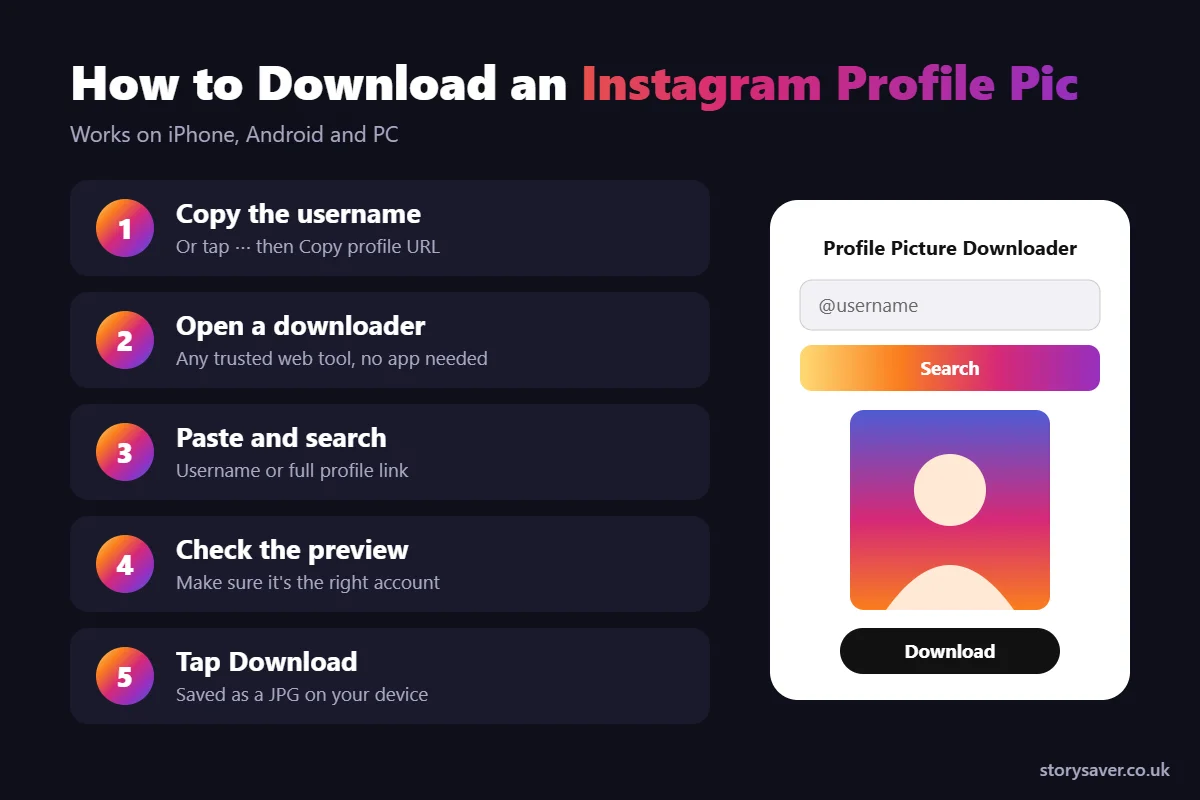
- Copy the username. Open the profile and copy the @handle, or tap the three dots and choose “Copy profile URL”.
- Open a downloader in your browser. No app needed.
- Paste and search.
- Check the preview so you know it’s the right account.
- Tap Download. The file is usually a JPG.
On iPhone, Safari saves it to Files, then Downloads, not Photos. Long-press the preview and pick “Save to Photos” if you want it in your camera roll.
What Size Will You Get?
Instagram doesn’t publish an official profile picture size, but the widely reported stored size is 320 × 320 pixels.
Some newer uploads are available bigger, sometimes 640 px or more. Older photos may only exist at 320 px. So be sceptical of tools promising “HD” or “4K”. A downloader can only give you what Instagram serves, and stretching a small image doesn’t add detail.
Can You See a Private Account’s Profile Picture?
Yes. Profile photos are public on every account, private ones included.
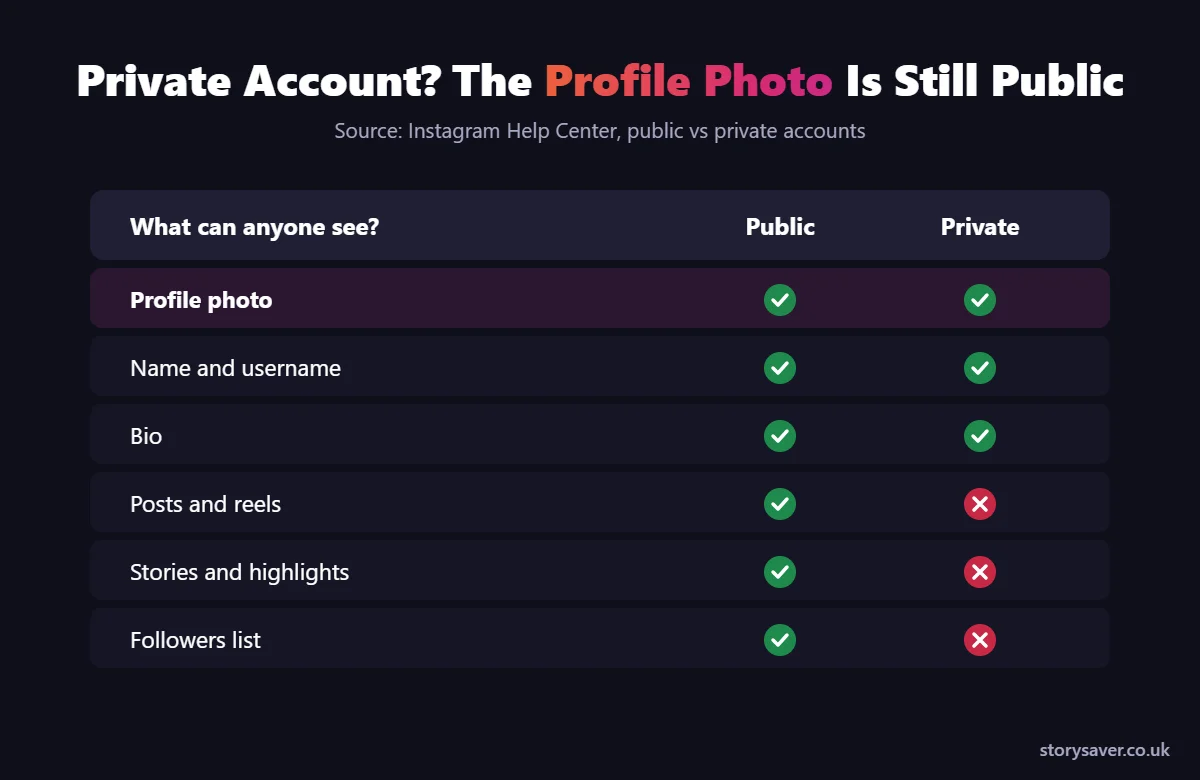
Instagram’s Help Center says your profile photo, name, username and bio can be seen by anyone on or off Instagram, even on a private account. What stays hidden is the posts, stories and follower list. No real tool can show those, so treat any site that promises to “see private posts” as a scam.
Does Instagram Notify Someone?
No. Instagram doesn’t send any notification when someone views, screenshots or downloads a profile picture.
Stories are different, because Instagram shows the owner a list of viewers. That’s why people use tools like our Instagram story saver to watch public stories without showing up in that list.
How to Download Your Own Profile Picture
The fastest way is to put your own username into a downloader. For a full backup of your account, use Instagram’s official export:
- Go to your profile, tap the menu, then Accounts Center.
- Tap Your information and permissions, then Export your information.
- Choose your profile, pick Export to device and start the export.
Instagram emails you when it’s ready, and the Instagram Help Center says you then have 4 days to download it.
Is It Safe?
A web-based Instagram profile picture downloader that only asks for a username is generally safe. The risk is tools that want more.
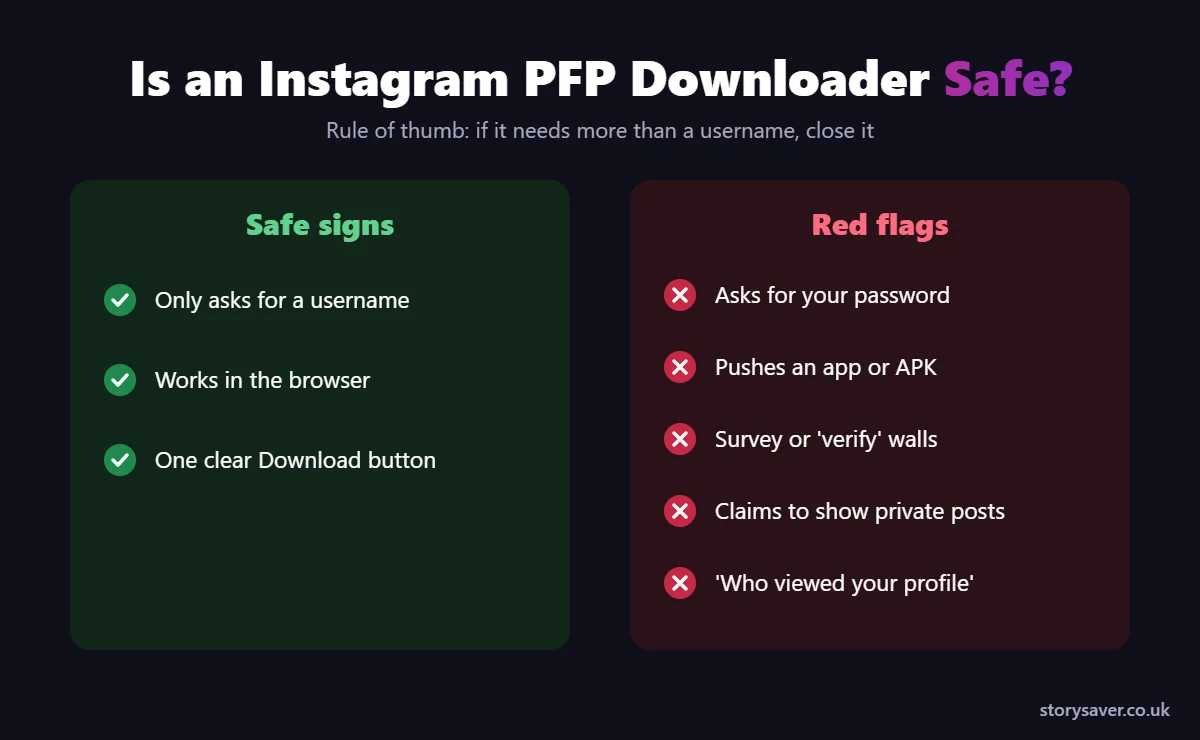
- Never enter your Instagram password. Fake “follower booster” apps have been caught stealing logins this way.
- Skip apps and APKs. A browser tool does the same job.
- Ignore extra “Download” buttons on ad-heavy sites. The real one sits under your preview.
Saving a photo to look at it is one thing. Reposting it, or using someone’s face as your own, is where copyright and privacy problems start.
Common Problems
| Problem | Fix |
|---|---|
| “User not found” | Copy the profile URL instead of typing the name |
| Blurry photo | The original was small; no tool can fix that |
| Old photo shows | The owner just changed it; try again in a few minutes |
| Saved link stopped working | Instagram image links expire; search the username again |
Choosing your own photo? Upload a square image of at least 320 × 320 px with your face in the centre, since the circle cuts off the corners. Your posts follow different rules and now show as 3:4 tiles in the new Instagram grid layout.
FAQ
Can you see an Instagram profile picture in full size?
Not inside the app, which only shows a small circle. A profile picture downloader shows the largest version Instagram serves, often 320 px or bigger depending on what the owner uploaded. Older photos may only exist at 320 px, so no tool can make them sharper than that.
Can I download a private account’s profile picture?
Yes. Instagram makes profile photos visible to everyone, even on private accounts, so a downloader can show and save it. What you can’t see are the account’s posts, stories or followers. Any site claiming to show those is fake or after your login, so it’s best avoided.
Will the person know I downloaded their profile picture?
No. Instagram doesn’t send any alert when someone views, zooms, screenshots or downloads a profile picture. Only story views are recorded and shown to the owner. The downloader website itself may keep logs of searches, like most sites do, so it isn’t completely invisible.
Is it legal to download someone’s Instagram profile picture?
Saving a public profile photo for your own private use is generally fine in the UK and US. Problems start when you repost it, use it commercially or pretend it’s yours, because the photographer usually owns the copyright. This isn’t legal advice, so check before reusing any image.
Do I need to log in to use an Instagram profile downloader?
No, and you shouldn’t. A proper downloader only needs a username or profile link because profile photos are public. If a site or app asks for your Instagram password, close it. A stolen account is much harder to fix than a missing photo.
Bottom line: a good IG pfp downloader only needs a username, gives you the real upload size and never asks for your password. Want more free, no-login Instagram tools? Browse all Story Saver tools.