
The best Instagram profile picture size is 320 × 320 pixels, a square 1:1 image. Instagram shows it as a circle about 110 pixels wide on your phone, so a square upload of 320 px or larger with your face or logo in the center works best.
That’s the short answer. Below you’ll find every other size you’re likely to need (posts, Stories, Reels and carousels), plus why profile photos sometimes come out blurry and how to fix it.
Quick answer: what size is an Instagram profile picture?
Upload a square image of at least 320 × 320 pixels (1:1 aspect ratio). Instagram stores it at that size and displays it as a circle, about 110 × 110 pixels on mobile. Keep the main subject in the center, because the corners are cut off, and use a JPG or PNG file.
What Is the Instagram Profile Picture Size?
Your Instagram profile picture (also called a profile photo, PFP or DP) is the round image next to your username.
Instagram doesn’t publish an official profile photo size, but almost every guide agrees on the same numbers:
| What | Size |
|---|---|
| Recommended upload | 320 × 320 px or larger, square (1:1) |
| Shown on your profile (mobile) | About 110 × 110 px, cropped to a circle |
| Shown next to comments | As small as 32 px |
| File type | JPG for photos, PNG for logos and graphics |
Some guides suggest uploading a bigger square, like 1080 × 1080 px, so you have extra detail to spare. That’s fine. Instagram will scale it down, and it gives you a cleaner result than starting with a small, already compressed image.
How to Crop Your Profile Picture for the Circle
The circle cuts off all four corners of your square image, so anything important has to sit in the middle, no matter what Instagram profile picture size you upload.
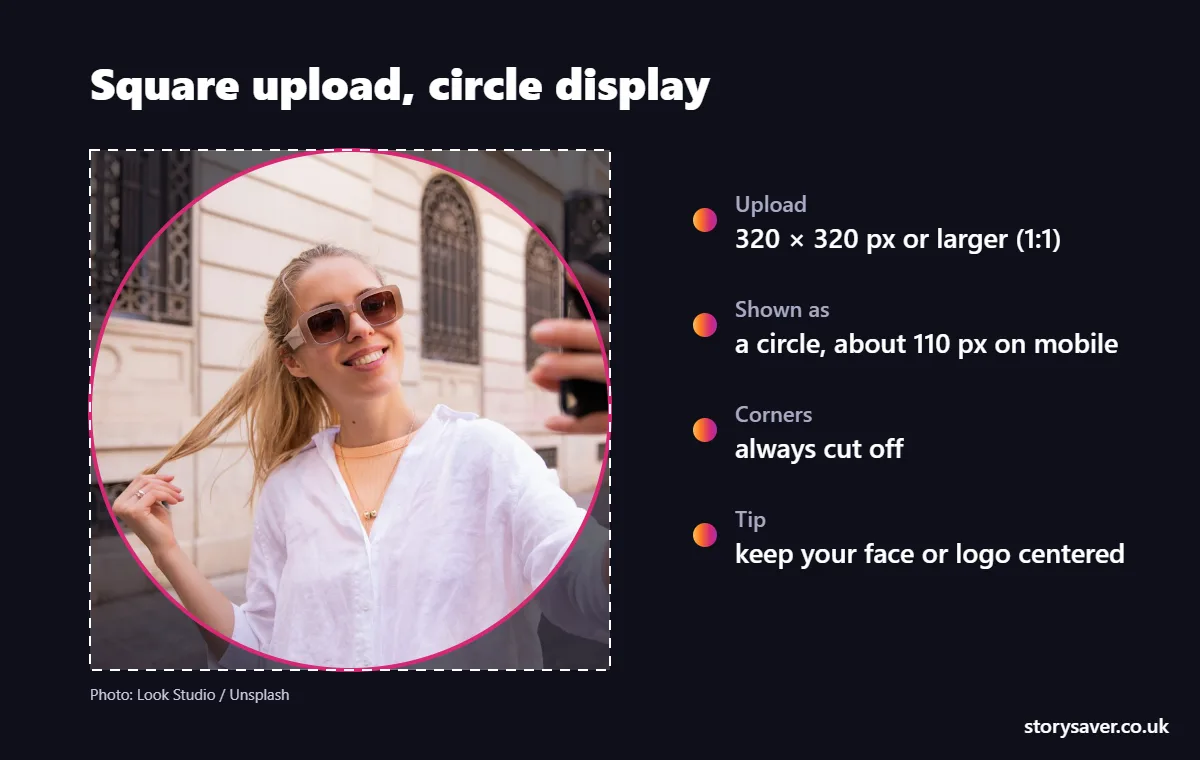
- Start with a square crop. Most phone photo editors have a 1:1 crop option.
- Center your face or logo, and leave some space around it. A face that touches the edges of the square will lose the top of the head.
- Check it small. Zoom out until the picture is about the size of a fingernail. If you can still tell what it is, it’ll work.
- Upload it from your profile: tap Edit profile, then Edit picture or avatar, and choose the photo.
Logos are where this goes wrong most often. A wide logo with text on both sides will get chopped. Use just the icon, or put the full logo on a plain square background with plenty of padding.
Why Does My Instagram Profile Picture Look Blurry?
A blurry profile photo is usually caused by a small or already compressed source image, not by Instagram itself. Getting the Instagram profile picture size right fixes most of it.
- You uploaded a screenshot or a photo that’s been saved and re-sent a few times. Each copy loses quality. Use the original file.
- The image is too small. Anything under 320 px gets stretched. Start with at least 320 × 320 px.
- The subject is tiny. A full-body shot shrunk to 110 px will always look soft. Crop in closer.
- Busy backgrounds turn to mush at that size. A plain background looks sharper.
People often ask whether they can see someone else’s profile picture in full size. Instagram doesn’t offer that in the app, and even third-party tools can only show the size the owner actually uploaded.
Instagram Post Size and Dimensions
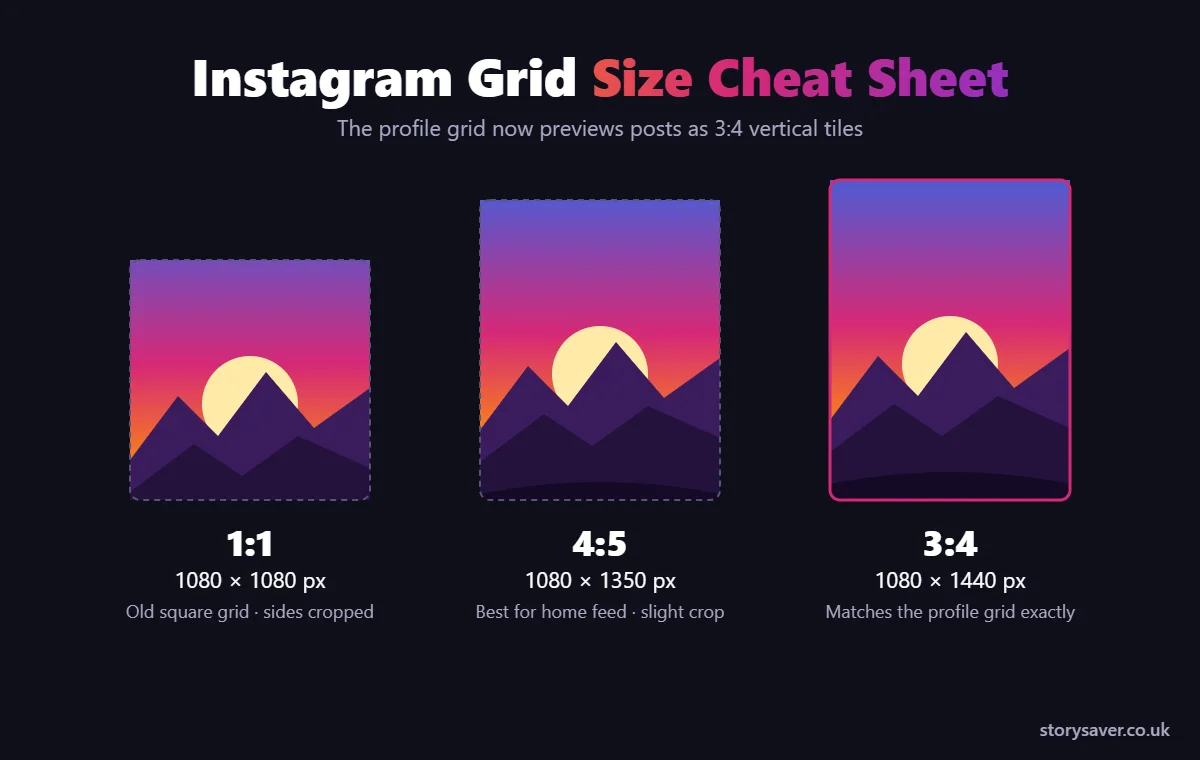
The standard Instagram post size is 1080 pixels wide, with a height that depends on the aspect ratio you choose.
| Post type | Instagram post dimensions | Aspect ratio |
|---|---|---|
| Portrait (most popular) | 1080 × 1350 px | 4:5 |
| Tall portrait | 1080 × 1440 px | 3:4 |
| Square | 1080 × 1080 px | 1:1 |
| Landscape | 1080 × 566 px | 1.91:1 |
Honestly, 4:5 portrait is the safest choice for most posts. It takes up more room in the feed than a square, and it works everywhere, including scheduling tools.
The 3:4 size is newer. Instagram’s profile grid now shows posts as 3:4 rectangles instead of squares, and the app keeps 3:4 photos at that shape when you post them directly. Some scheduling tools still cap uploads at 4:5, so check before you rely on it. If your profile layout matters to you, our guide on the new Instagram grid size goes into the details.
Whatever ratio you pick, export at 1080 px wide. Instagram’s Help Center says it uploads photos at the best resolution possible, up to 1080 pixels, so going wider won’t make your post sharper.
Carousel posts
A carousel can hold up to 20 photos or videos when you post from the app. Every slide uses the shape of the first one, so pick your ratio before you start. Want one wide photo to scroll across several slides? The Instagram carousel splitter cuts it into perfectly sized pieces.
Instagram Story Dimensions
Instagram Story dimensions are 1080 × 1920 pixels, a vertical 9:16 aspect ratio that fills the whole phone screen.
The top and bottom of a Story are covered by your profile name, the reply bar and buttons. Meta’s ad guidance suggests keeping roughly the top 14% and bottom 35% of the frame clear of text and logos. That’s a good rule for normal Stories too.
Story Highlight covers use the same 1080 × 1920 canvas, but only a small circle in the middle shows on your profile, so put your icon dead center.
Instagram Reels Size
Reels use the same size as Stories: 1080 × 1920 pixels at 9:16.
The catch is the cover. On your profile grid, a Reel cover is cropped to a 3:4 rectangle, so the top and bottom of a full-screen cover are hidden. Keep any title text in the middle of the frame and it’ll show up in both places.
Instagram Image Size Guide: Cheat Sheet
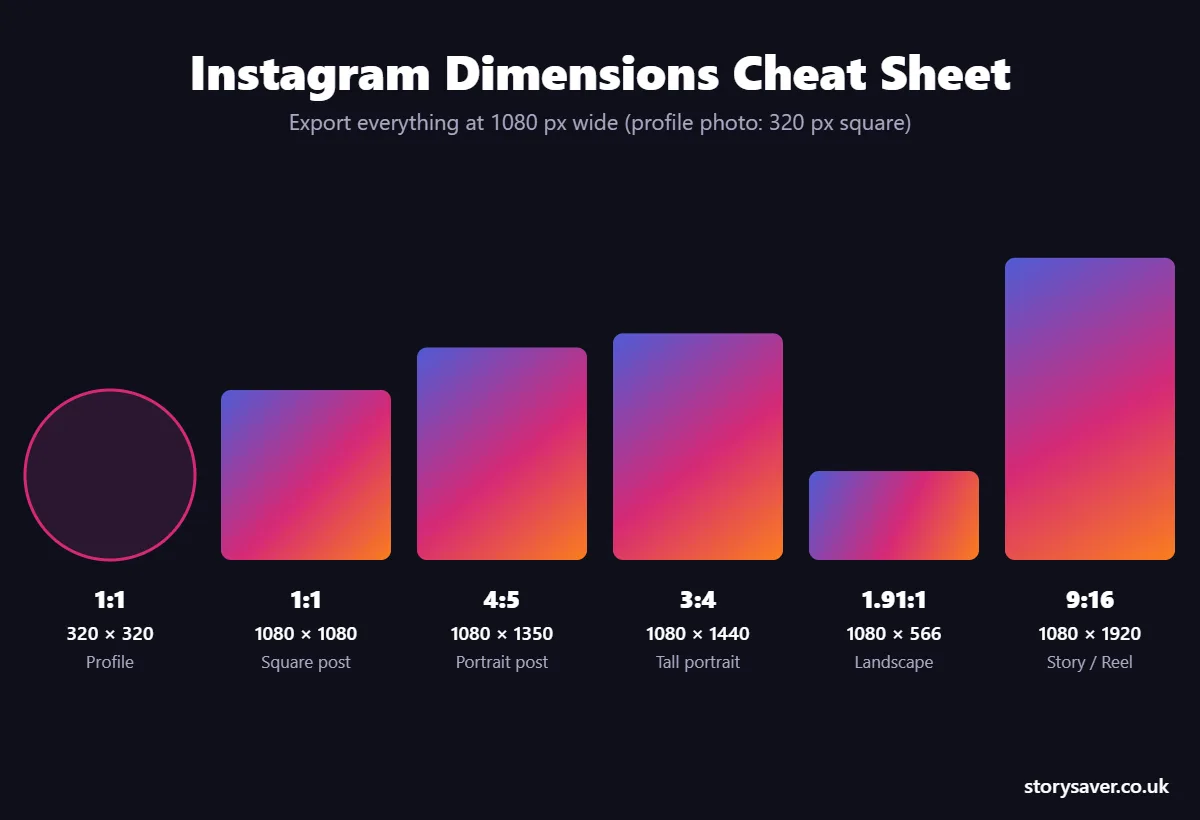
Here are all the Instagram dimensions from this guide in one table, so you can bookmark it.
| Format | Size (px) | Ratio |
|---|---|---|
| Profile photo | 320 × 320 | 1:1 |
| Portrait post | 1080 × 1350 | 4:5 |
| Tall portrait post | 1080 × 1440 | 3:4 |
| Square post | 1080 × 1080 | 1:1 |
| Landscape post | 1080 × 566 | 1.91:1 |
| Story, Reel, Highlight cover | 1080 × 1920 | 9:16 |
Want to see someone else’s profile photo in full size? Our Instagram profile picture downloader guide shows how to view and save any DP by username. And if you’re still getting used to the slang, here’s what PFP and DP mean on Instagram.
FAQ
What is the best Instagram profile photo size?
The best Instagram profile photo size is a square of at least 320 × 320 pixels. You can upload a larger square, such as 1080 × 1080, and Instagram will scale it down. Keep your face or logo centered, because the image is shown as a small circle and the corners are cut off.
Why is my Instagram profile picture cut off?
Instagram crops every profile picture into a circle, so anything near the corners or edges of your square image disappears. Move the main subject to the center and leave some space around it. Wide logos are the most common problem, so use just the icon or add padding before you upload.
What size should an Instagram post be?
Most Instagram posts should be 1080 × 1350 pixels, the 4:5 portrait size, because it fills more of the feed. You can also post squares at 1080 × 1080, landscape images at 1080 × 566, or taller 3:4 photos at 1080 × 1440 if you’re posting straight from the app.
What are the Instagram Story dimensions?
Instagram Stories are 1080 × 1920 pixels, a 9:16 vertical ratio that fills the phone screen. Reels and Highlight covers use the same size. Keep text and logos away from roughly the top and bottom of the frame, where your username, buttons and the reply bar sit.
Can I upload a profile picture that isn’t square?
Yes, but Instagram will make you crop it into a square before it’s shown as a circle. It’s better to crop it yourself first, so you control exactly what stays in the frame. Most phone photo editors have a 1:1 crop that takes a few seconds.
Does Instagram reduce photo quality?
Instagram compresses every upload, and it won’t keep images wider than 1080 pixels. To get the sharpest result, export at exactly 1080 px wide, use a good-quality JPG and upload the original file rather than a screenshot or a photo that’s been sent through other apps.
Before You Post
If you remember one thing, make it this: profile photos are 320 px squares shown as circles, posts are 1080 px wide, and Stories and Reels are 1080 × 1920. Get those right and Instagram won’t have to crop or stretch anything.
Want your bio to look as good as your photos? Try our free Instagram font generator to style your name and bio in seconds.