
If you want to bold text on Instagram, you’ll need a little workaround, because the app doesn’t give you a bold button. You type your words into a bold text generator, copy what it gives you, and paste it into your bio, caption, comment or DM. Takes ten seconds, maybe less. The same trick works for other fancy text too, like italic or script.
Quick answer: how do you bold text on Instagram?
Instagram has no bold option in captions, bios or comments. To get bold text, type your words into a free bold text generator, copy the bold version and paste it into Instagram. The letters are special Unicode characters rather than a font, so they look bold on iPhone, Android and computers alike.
In a hurry? Our free Instagram font generator does it for you. Type, tap Copy next to “Bold”, paste.
Does Instagram Have a Bold Option in 2026?
No, not in the places most people care about. Captions, bios and comments still don’t have any text formatting buttons, and pressing Ctrl+B on instagram.com won’t do a thing. There’s no bold font in the Instagram app settings either.
Things are slowly changing in a couple of spots, though. Some people now see bold, italic and strikethrough options in DMs when they long-press a word. It started showing up in 2025 and it’s still rolling out, so don’t worry if you don’t have it yet.
Instagram also launched a paid add-on called Instagram Plus. In the US it costs $3.99 a month, and one of the perks is a custom bio font. Instagram hasn’t said if a real bold style is part of that.
And in Stories, you’ve always had a few fonts to pick from. The one called Strong is thick and heavy, so it’s the easiest way to get bold text on an Instagram story.
Making Reels? Instagram’s free video app, Edits, has its own set of text fonts and caption styles, and some of them are nice and heavy. Those fonts only live inside your video, though. You can’t copy them into a bio or caption.
For your bio, captions and comments, though, copy-and-paste bold letters are still the way to go. They’re free and everyone sees them.
How to Bold Text on Instagram in 4 Steps
It works the same way whether you’re editing your bio, writing a caption or replying to a comment.
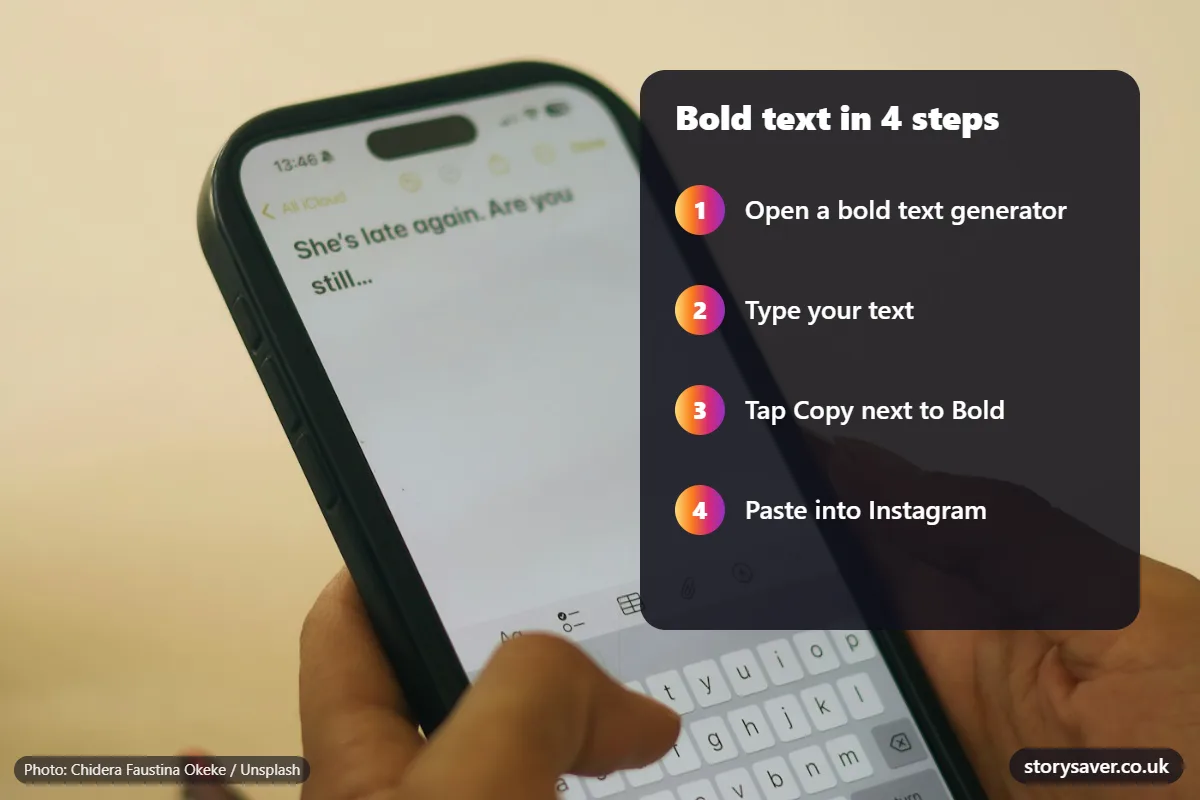
- Open a bold text generator in your browser. Ours is free and needs no login.
- Type the words you want in bold.
- Tap Copy next to the bold style you like.
- Go back to Instagram and paste. For your bio, that’s your profile, then Edit profile, then Bio. Paste and tap Done.
One small tip: bold a few words, not the whole thing. A bio that’s all bold is surprisingly hard to read on a small screen.
What Are Bold Letters, Really?
Bold letters on Instagram are special characters that just happen to look like thick versions of normal letters. Your phone treats them as text, the same way it treats an emoji.
They come from a part of Unicode called Mathematical Alphanumeric Symbols. It was added back in 2001 so people could write math formulas. The bold “𝐀”, for example, has its own code, U+1D400. So a generator doesn’t really make text bold. It swaps each letter you type for its bold twin.
That’s why it works everywhere. You copy text, you paste text, and anyone looking at your profile sees bold.
Where Instagram Bold Text Works
You can use Instagram bold text almost anywhere you type. The username is the big exception.
| Where | Bold works? | Good to know |
|---|---|---|
| Bio | Yes | 150-character limit |
| Captions | Yes | 2,200-character limit |
| Comments | Yes | Paste it like normal text |
| DMs | Yes | You might also have built-in formatting |
| Name (display name) | Usually | 30 characters, and some symbols get refused |
| Username | No | Only letters, numbers, periods and underscores |
| Stories | Use Strong | The built-in font looks better than pasted bold |
| Reels text | Use Edits fonts | Heavy fonts are built into the editor |
Bold Text on iPhone, Android and Desktop
Copy and paste works the same on all of them. If you use the same bold phrase a lot, like your brand name, you can save yourself some time.
On an iPhone, go to Settings, then General, then Keyboard, then Text Replacement. Paste your bold phrase there and give it a short code. Now when you type the code, your iPhone fills in the bold version.
On Android, Gboard and Samsung Keyboard both paste bold letters with no trouble. You can pin the phrase in your clipboard so it’s always one tap away.
On a computer, paste from the generator straight into instagram.com. Bold you copy from Word or Google Docs won’t stick, because that’s real formatting and Instagram throws it away.
There are also keyboard apps that type bold for you. A lot of them want a subscription, and on iPhone they ask for “Full Access” to your keyboard. I’d skip them and just use a website.
Which Bold Style Should You Pick?
Most generators give you a long list of stylish text options. Go with sans-serif bold if you’re not sure. It’s clean, it matches the rest of Instagram, and it shows up properly on nearly every phone.
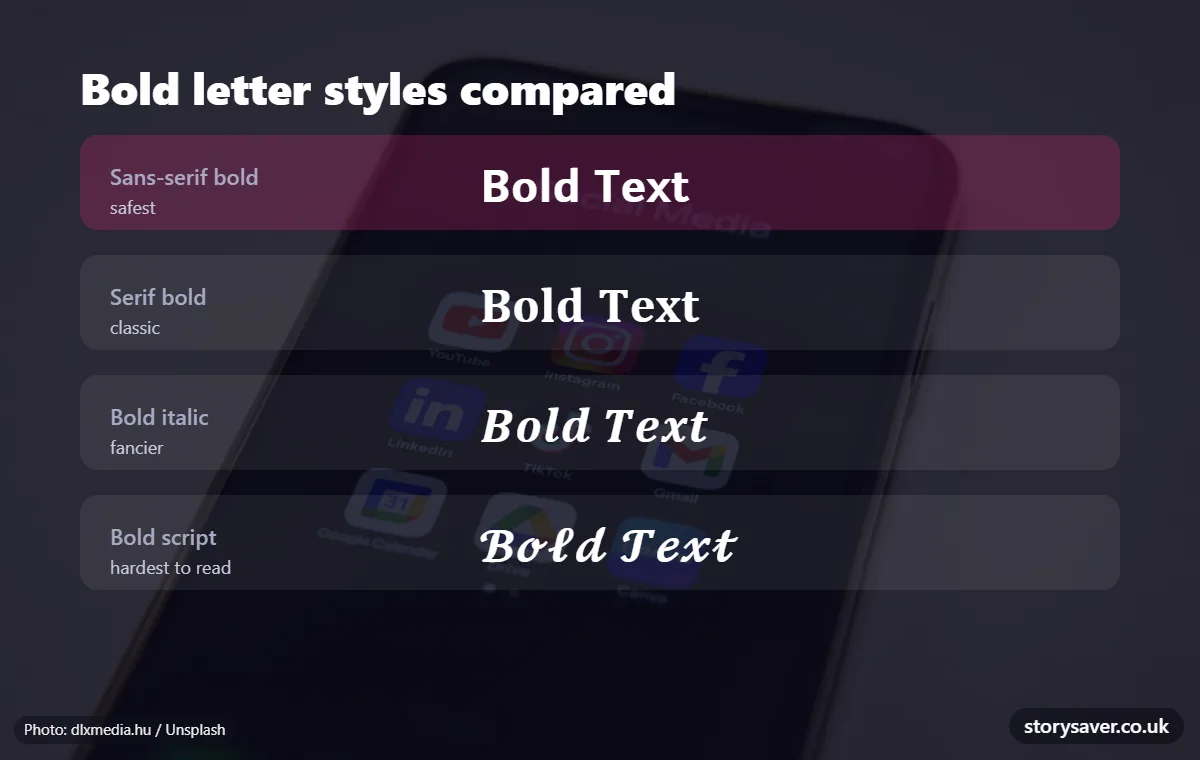
Serif bold (𝐁𝐨𝐥𝐝) has a more classic look. Bold italic (𝑩𝒐𝒍𝒅) and bold script (𝓑𝓸𝓵𝓭) are pretty, but they get hard to read when the text is small. Also, the italic styles don’t have italic numbers, so any digits you type will stay upright.
Want bold and italic together? Pick the bold italic style. You can’t stack two styles on the same letter, so it’s one or the other per word.
Here’s a fun quirk if you look closely. In plain italic, the small “h” sits in a different part of Unicode than the other letters (it was already there as a physics symbol). Most generators handle it fine, but on a few phones that one letter looks a little off.
Bold Letters and the Bio Character Limit
If you use a bold font in your Instagram bio, watch the count. Bold letters can eat into your character limit faster than normal ones. Behind the scenes, each bold letter takes up two spaces in the code, and some apps count it as two characters. Instagram’s bio counter may do the same.
So if your bio barely fits in plain text, it might not fit once it’s all bold. Keep an eye on the counter before you hit save. Our generator has a counter built in for the bio (150), name (30) and caption (2,200).
Things Bold Text Breaks
Bold looks nice, but it changes how Instagram reads your words, and that has a few side effects.
Search is the big one. Instagram reads the words in your bio and captions, and to the app, “𝐁𝐚𝐤𝐞𝐫𝐲” and “bakery” are two different things. If people search for “bakery”, your bold version might not come up.
Hashtags and @mentions stop working too. A bold hashtag won’t link anywhere, so type those normally. And since Instagram now allows only 5 hashtags per post (that cap started in December 2025), each one counts. Don’t waste one on a bold tag that doesn’t work.
Accessibility takes a hit as well. Screen readers can have a hard time. VoiceOver and TalkBack sometimes read bold letters one at a time, or call them math symbols, which isn’t great for people who rely on them.
And on some older phones, the letters just show up as little empty boxes.
None of this means you shouldn’t use bold. Just use it on a few words, and keep your name, keywords and hashtags in plain text.
Bold Text Examples You Can Copy
These are the kinds of places where a bit of bold actually helps:
- A bio headline, like 𝗪𝗲𝗱𝗱𝗶𝗻𝗴 𝗣𝗵𝗼𝘁𝗼𝗴𝗿𝗮𝗽𝗵𝗲𝗿 · Austin, TX
- The first line of a caption, like 𝗦𝗮𝘃𝗲 𝘁𝗵𝗶𝘀 𝗳𝗼𝗿 𝗹𝗮𝘁𝗲𝗿, with the rest written normally
- A call to action at the end, like 𝗟𝗶𝗻𝗸 𝗶𝗻 𝗯𝗶𝗼 to shop the drop
A bold opening line works really well on carousel posts. If you want to turn one wide photo into a swipeable carousel, the Instagram carousel splitter will cut it into slides for you. Giving your whole profile a refresh? Our guide to the new Instagram grid layout explains the 3:4 post size.
How to Turn Bold Text Back to Normal
Changed your mind? You can’t un-bold the letters with a button, because they aren’t formatted. They’re different characters. So the fix is simple: delete the bold part and type it again with your normal keyboard.
Got a long bold caption you want back as plain text? Paste it into a “Unicode to normal text” converter, copy the plain result and paste it back in. That’s quicker than retyping a whole paragraph.
Bold Text on Threads, Facebook and WhatsApp
Copy-paste bold isn’t just an Instagram thing. Here’s how the other Meta apps handle it:
| App | Built-in bold? | How to do it |
|---|---|---|
| No (DMs rolling out) | Paste bold letters from a generator | |
| Threads | No | Same copy-paste trick works |
| Facebook posts | No | Copy-paste works in posts and comments |
| Yes | Put stars around a word, like *hello* |
One thing to know: the WhatsApp star trick doesn’t carry over. If you type *hello* on Instagram, people just see the stars.
Bold Text Not Working? Quick Fixes
| What’s happening | What to do |
|---|---|
| You see boxes instead of letters | Try sans-serif bold, it works on the most phones |
| Your username won’t save | Usernames can’t be bold, so use the Name field |
| Your bio is “too long” | Bold fewer words, since bold letters can count double |
| The Copy button does nothing | Open the site in Safari or Chrome instead of inside another app |
FAQ
Can you bold text on Instagram without an app?
Yes, you don’t have to download anything. Just open a bold text generator in your phone’s browser, type what you want, copy the bold version and paste it into Instagram. It works the same on iPhone, Android and computers, since the bold letters are really just text that any device can copy.
How do I make my Instagram bio bold?
Type the line you want in bold into a generator and copy it. Then go to your profile, tap Edit profile, tap Bio, paste it in and tap Done. Most people bold just one line, like what they do or where they’re based, and leave the rest plain so it’s easy to read.
Can you bold text in Instagram DMs?
You can. Some people now have a built-in option: long-press a word in your message and pick bold. It’s still rolling out, so you might not see it. If it’s not there for you, paste bold letters from a generator instead. They work in any chat, and the other person sees them too.
Can I make my Instagram username bold?
No, sadly. Instagram usernames only accept letters, numbers, periods and underscores, so bold letters get turned down. You can put bold in your Name field instead, which shows up above your bio. Just keep part of your real name in normal letters so people can still find you in search.
Why doesn’t Ctrl+B work on Instagram?
Because Instagram’s text boxes don’t support any formatting at all. Captions, bios and comments are plain text, so shortcuts like Ctrl+B or Cmd+B don’t do anything, and bold copied from Word or Google Docs gets stripped out. Pasting special bold characters from a generator is the only way to get it.
Is bold text bad for Instagram SEO?
Only if you go overboard. Instagram search reads the words in your bio and captions, and bold letters aren’t the same characters as normal ones, so a bold keyword might not match what people type. Bold a short hook or a call to action, and leave your keywords, hashtags and name in regular text.
How do I change bold text back to normal on Instagram?
Bold letters are separate characters, not formatting, so there’s no button to undo them. Delete the bold words and type them again with your keyboard. For a long caption, paste it into a Unicode to normal text converter, copy the plain version and paste it back. Then tap Done or Save so the change sticks.
Does bold text work on Threads and WhatsApp?
Yes, but in different ways. On Threads, which has no bold button, you paste bold letters from a generator just like on Instagram. WhatsApp has built-in bold: put a star on each side of a word, like *this*. That star trick only works inside WhatsApp, so on Instagram you’ll still need copy-paste bold.
Before You Paste
Think of bold like a highlighter. One line is plenty. If everything’s bold, nothing stands out.
Want to give it a go? Open the free Instagram font generator, type your text and copy your bold letters.